Bankers
Folder: Configs/Bankers/ (any file name, .cfg)
Controls which items a Banker NPC will accept for deposit and withdrawal. Once you have written a profile here, put its name in a Banker-type NPC's Profile field to make it live — see Core identity settings.
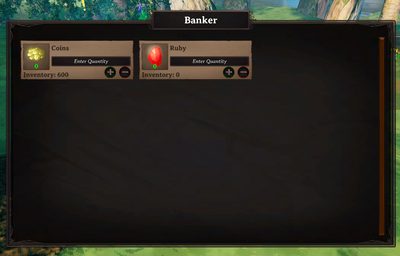
Example
Configs/Bankers/main_bank.cfg:
[main_bank]
Coins
Ruby
Amber
One item name per line — this list only decides which item types can be banked at all; how much a player has deposited is tracked automatically and does not live in this file.
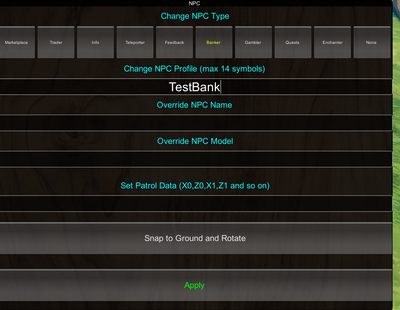
Assigning it to an NPC
Put the profile name (main_bank above) into a Banker-type NPC's Profile field — see Core identity settings:
Accessing a bank without a nearby NPC
A Banker profile can also be reached remotely, without a Banker NPC in range at all, by listing it under BankerProfiles in Distanced UI.
Interest
Interest on deposits is not set here — it is a server-wide setting. See Server config for BankerIncomeTime, BankerIncomeMultiplier, and BankerInterestItems.
Looking for a separate, higher interest rate for a privileged player tier? That setting was removed in 9.9.2 — see Migrations.
Related
- Profiles — how a banker profile name groups entries across files.
- Server config — interest rate settings.
- Distanced UI — remote access without a nearby NPC.
- Shop and economy guide.