Traders
Folder: Configs/Traders/ (any file name, .cfg)
Fixed-price shop listings for a Trader NPC — spend a set item to get a set item back, no randomness involved. Once you have written a profile here, put its name in a Trader-type NPC's Profile field to make it live — see Core identity settings. It can also be reached remotely, without a nearby NPC, by listing it under TraderProfiles in Distanced UI.
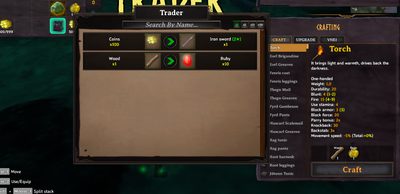
The x1 / x5 / x10 / x100 buttons in the top right of the trade window scale a trade's quantities on both sides at once for faster bulk trading — Coins, 5, Wood, 1 at x100 becomes 500 Coins for 100 Wood, not a different trade.
Example
Configs/Traders/general_store.cfg:
[general_store]
Wood, 10, Coins, 5
Coins, 50, SwordIron, 1, 2
Each line is one trade offer. Format: cost item, cost amount, result item, result amount, [result level]. The second line sells a level-2 Iron Sword for 50 Coins.
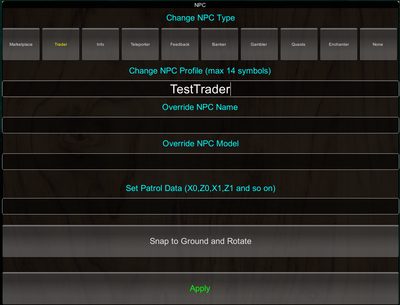
Assigning the profile to an NPC's Profile field:
Trading more than one item per side
Wrap both sides with = to trade bundles of items instead of one-to-one — up to 5 items per side, and any item on either side can carry its own , level field:
Coins, 100, Ruby, 1 = SwordSilver, 1, 3
Spend 100 Coins and 1 Ruby to receive a level-3 Silver Sword.
GreydwarfEye, 10, Wood, 20 = BowFineWood, 1, 2
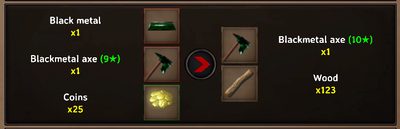
BlackMetal, 1, AxeBlackMetal, 1, 9, Coins, 25 = AxeBlackMetal, 1, 10, Wood, 123
Spend 1 BlackMetal, a level-9 Iron Axe, and 25 Coins, to receive a level-10 Iron Axe and 123 Wood:
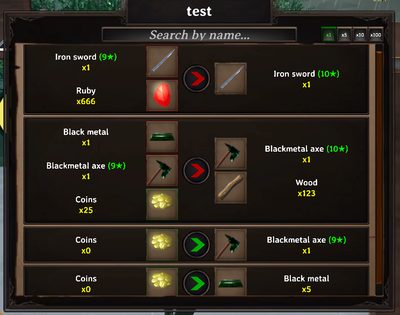
You can mix plain 4/5-field lines and =-bundled lines freely within the same profile:
Configs/Traders/mixed_formats.cfg:
[mixed_formats]
SwordIron, 1, 9, Ruby, 666 = SwordIron, 1, 10
BlackMetal, 1, AxeBlackMetal, 1, 9, Coins, 25 = AxeBlackMetal, 1, 10, Wood, 123
Coins, 0 = AxeBlackMetal, 1, 9
Coins, 0, BlackMetal, 5
Pets as trade results
A creature name on the result side gives a tamed pet instead of an item — spawned already-tamed in front of the player, the same way a quest Pet reward works. The level field becomes the pet's level, shown one star lower on the confirmation screen (a level 5 Wolf displays as 4 stars, since Valheim counts stars from 0 while this field counts from 1):
Configs/Traders/pets_trader.cfg:
[pets_trader]
Stone, 100, Wolf, 1, 5
Ruby, 25, Boar, 10, 2
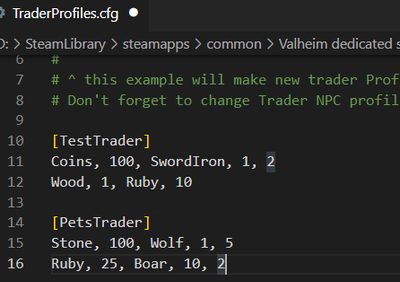
Trading Stone for a tamed Wolf, or Ruby for a tamed Boar:
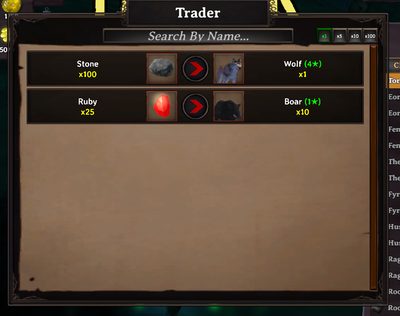
A creature is only recognized on the result side — the cost side always expects a plain item.
Locking trades behind item discovery
Add = true to a profile header to only show trades for items the player has already discovered/picked up in the world:
Configs/Traders/rare_goods.cfg:
[rare_goods = true]
Coins, 200, Ruby, 1 = SwordSilver, 1, 3
Leave the header plain ([profile]) for trades that are always visible, regardless of what the player has found.
Scheduling a trader to specific hours
Traders can be limited to a real-clock time window using a folder naming trick — see Scheduling a config to a time window.
Configs/Traders/18-00_23-00/evening_specials.cfg
Related
- Profiles — how a trader profile name groups trades across files.
- Scheduling a config to a time window.
- Distanced UI — remote access without a nearby NPC.
- Shop and economy guide.