NPC system
NPCs are placed in the world using Marketplace Hammer, a build-mode tool. Once placed, you configure an NPC through its own settings panel — no config file needed for the NPC itself (though you can export one for reuse, see Saved NPCs).
NPC types
An NPC's Type decides what it does, and which profile folder its Profile field looks into:
| Type | Profile comes from | See |
|---|---|---|
None |
— | No mechanic — a decorative or dialogue-only NPC. |
Trader |
Traders | Traders |
Info |
Server Info | Server Info |
Teleporter |
Teleporters | Teleporters |
Feedback |
— | No config folder — posts player feedback to the Feedback Discord webhook. |
Banker |
Bankers | Bankers |
Gambler |
Gamblers | Gamblers |
Quests |
Quest Profiles | Quest Profiles |
Buffer |
Buffer Profiles | Buffer Profiles |
Transmog |
Transmogrifications | Transmogrification |
Marketplace |
— | The player-to-player auction NPC — no setup needed, works immediately. |
Mail |
— | Opens the mail menu. |
Every NPC also has an optional Dialogue field, separate from its Type — any NPC, including None, can have a full conversation attached (see Dialogues).
Core identity settings
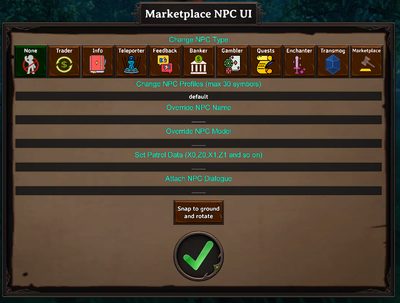
| Setting | What it does |
|---|---|
| Type | One of the types above. |
| Name Override | A custom display name. |
| Profile | Which profile this NPC uses, from the folder matching its Type. |
| Model/Prefab Override | Swaps the NPC's appearance for a different creature/character model — supports the animation-swap trick and randomized pools, see Prefabs and text markup. |
| Dialogue | A dialogue ID from Dialogues. |
| Pin Icon | The map pin shown for this NPC, if any. |
| Visibility Condition | A condition, same syntax as anywhere else it's used. Leave it empty and the NPC is visible to everyone, as before. Set one and the whole NPC — not just a dialogue option — disappears client-side for any player who doesn't currently pass it, re-checked every couple of seconds. In debug mode (OverrideDebug), a hidden NPC shows a placeholder marker instead of vanishing outright, so you can still find it while testing. |
Appearance settings
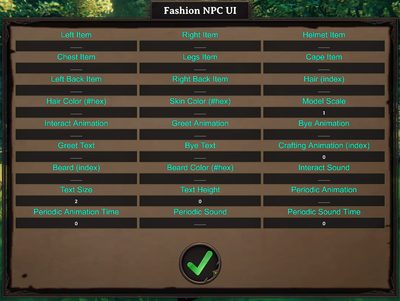
Set through the NPC's fashion panel: left/right hand items, helmet, chest, legs, cape, hair, hair color, beard, beard color, skin color, model scale, hidden-item toggles, greeting/farewell text and animations, crafting animation, interact sound and animation, text size/height, and periodic idle animation/sound.
Most appearance fields accept a space-separated list of options — when you place a Saved NPC template, one of them is picked at random (an even chance for each, first and last included), so a single template can produce visual variety across several placements. The pick is made once, at the moment you place the NPC, and is stored on that NPC — it never re-rolls, not on a reload and not on a restart. There is a catch with placing several copies in a row, see Known gaps. Greeting/farewell text also supports dynamic placeholders like %playername%.
Periodic animation and periodic sound make the NPC occasionally play an idle animation or sound on their own — separate from Random NPC Speech, which handles idle text barks instead.
Wearing several items in one slot
Since 10.0.2 the item fields — left/right hand, left/right back (the hidden-item slots), helmet, cape, chest, legs, hair and beard — also take a comma-separated list, and every entry is equipped at once:
| Field | Example | Result |
|---|---|---|
| Left back item | SwordIron, ShieldBlackmetal |
Both carried on the NPC's back. |
| Chest | ArmorRootChest, ArmorTrollLeatherChest |
Both layered on. |
| Hair / beard | 4, 10 / 12, 13 |
Both styles worn together. |
Mind the difference between the two list styles: spaces mean "pick one at random" (only when placing a Saved NPC template — nothing picks for you in the fashion panel), commas mean "wear all of them". You can combine them — put spaces between the alternatives and none inside a group: 4,10 7 is either hairstyles 4 and 10 together, or hairstyle 7.
That matters when the NPC comes from a Saved NPC template: placing one cuts every list at its spaces and keeps a single piece before any commas are read, so SwordIron, ShieldBlackmetal (note the space) ends up as just one of the two. In a template, write a group with no spaces — SwordIron,ShieldBlackmetal. In the fashion panel of an NPC you've already placed there's no random step, so a comma list with spaces after the commas works as written — and a space-separated list of alternatives does not get split into options there, so don't type one.
Patrol routes
Give an NPC a patrol route two ways:
- Record it in-game: while holding Marketplace Hammer, drop waypoints as you walk the route, then confirm — the route is copied for you to paste into a
SetNPCPatrolcommand (see Commands). - Script it: use the
SetNPCPatrolcommand from a dialogue or quest event to set or change a patrol route on the fly.
Related
- Marketplace Hammer — the placement tool.
- Saved NPCs — exporting an NPC setup as a reusable template.
- Random NPC Speech — idle bark text.